Friday, 16 August 2013

Earn £8,000 a MONTH with bogus apps from Russian malware factories

DIY SMS-scam kits anyone can use - even your grandparents!

Just 10 professionally run malware-making workshops in Russia are responsible for 30 per cent of the Trojans, spyware and other nasties infecting smartphones globally. That's according to a study by mobile security outfit Lookout.
These underground crime labs churn out DIY kits ideal for scriptkiddies looking to make a fast buck: the tools can be used to distribute malware and earn money from it with little or no coding experience or hacking skills. Once installed on a device, the malware is typically disguised as a legit, popular app and secretly texts premium-rate numbers, thus racking up charges on the victims' phone bill.

The Russian development centres are skilled at releasing new Android builds and configurations of their code every two weeks; organising hosting for the malware; registering short-code phone numbers that victims' mobes text; and creating marketing campaign management tools — the malware developers' customers get paid for marketing and distributing the bogus apps.
These affiliates customise their copy of the malware to make it look like the latest Angry Birds or Skype utility, for example. Then they use social networks, such as Twitter, to draw people into downloading the booby-trapped software. Almost all the malware targets Android smartphones.
"We reviewed 250,000 unique Twitter handles and of those, nearly 50,000 linked directly to these toll fraud campaigns," Lookout researcher Ryan Smith explained in a blog post.
"The victim of the scheme is usually a Russian-speaking Android user looking for free apps, games, MP3s or pornography.
"The victim may have been using search engine or click through links in tweets or mobile ads, then unwittingly download the malicious app which secretly adds a premium SMS charge to their phone bill."
A research paper from Lookout on its Dragon Lady* investigation explains the malware creation centres have taken many ideas on how to run their businesses from legitimate small software houses.
"Organised groups of Android malware authors are operating like startups: tapping multiple individuals or organisations for specialisation in different business areas, leveraging online tools for promotion and developing affiliate programs," the Lookout team explained.
"We’ve seen evidence that these affiliate marketers have earned between $700/month to $12,000/month [£450/month to £7,800/month] from these scams, and estimate that there are thousands of individual distributors and potentially tens of thousands of affiliate websites promoting these custom SMS malware in the same manner as traditional affiliate web marketers."
More than 50 per cent of Lookout’s total malware detections during the first half of 2013 were Russian-based toll fraud. And 60 per cent of this activity can be traced back to just 10 centres in Russia.
Lookout has been actively tracking SMS fraud since the first example was found in the wild in August 2010. Lookout has been classifying Russian SMS-swindling malware in individual groups or “families” based on similarities in code and key features in the three years since. The data has also allowed the security biz to track individual malware families back to affiliates and the programmers' headquarters.
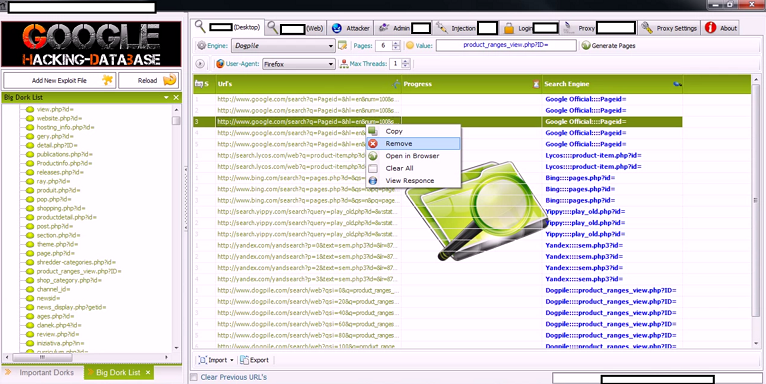
 

Hacking with new DIY Google Dorks based hacking tool

new version of DIY Google Dorks based hacking tool has been released, it is an extremely useful tool for reconnaissance of targets.

A Webroot blog post announced that a new version of DIY Google Dorks based hacking tool has been released in the wild and it could be used for mass website analysis, the power of the popular search engine could be exploited for information gathering during the reconnaissance phase of an attack. Similar tools could be used to acquire information on target environments by an attacker or by the pen tester to evaluate the architecture is starting to test. The availability of the DIY Google Dorks based hacking tool allows to ill-intentioned to acquire precious information on remotely exploitable websites, data that could be collected to compromise them for example deploying a malicious exploit kit or exploiting known vulnerabilities. The tool relies on Google Dorks the tools to allow a target evaluation, in particular the DIY Google Dorks based hacking tool has built-in features that can be used to evaluate the possibility to perform a SQL injection attack or to discover all the targets that aren’t protected by a CAPTCHA challenge mechanism. As usual the project appears under continuous development and the authors are still working on it to improve its capabilities with new features such as the possibility to evaluate the vulnerability to a custom malicious exploits. Composing specifically crafted queries in Google it is possible to reveal sensitive information essential for the success of an attack, thanks to the use of the advanced operator, the dorking, is possible to retrieve a huge quantity of information on a target such as:
  • User’s credentials.
  • Sensitive documents.
  • Admin login page.
  • Email lists.
The syntax for using advanced operator in Google is
Operator_name:keyword
Following some sample of keyword/advance operator:
Allintext Searches for occurrences of all the keywords given
Intext Searches for the occurrences of keywords all at once or one at a time
Inurl Searches for a URL matching one of the keywords
Allinurl Searches for a URL matching all the keywords in the query
Intitle Searches for occurrences of keywords in URL all or one
Allintitle Searches for occurrences of keywords all at a time
Site Specifically searches that particular site and lists all the results for that site
filetype Searches for a particular filetype mentioned in the query
Link Searches for external links to pages
Numrange Used to locate specific numbers in your searches
Daterange Used to search within a particular date range
Using more complex queries an attacker could obtain a series of information on the status of the target, for example to discover if it has been already “backdoored” and discovery which are the vulnerability that can potentially affect the system. The Google hacking database provides various examples of queries that can help a hacker to find vulnerable servers, to gain information on the target, to explore sensitive directories finding vulnerable files, to find password files or to find sensitive online shopping info.
inurl:”r00t.php”  – This dork finds websites that were hacked, backdoored and contains their system information allintext:”fs-admin.php – A foothold using allintext:”fs-admin.php” shows the world readable directories of a plug-in that enables WordPress to be used as a forum. Many of the results of the search also show error logs which give an attacker the server side paths including the home directory name. This name is often also used for the login to ftp and shell access, which exposes the system to attack. There is also an undisclosed flaw in version 1.3 of the software, as the author has mentioned in version 1.4 as a security fix, but does not tell us what it is that was patched. filetype:config inurl:web.config inurl:ftp – This google dork to find sensitive information of MySqlServer , “uid, and password” in web.config through ftp..filetype:config inurl:web.config inurl:ftp
The above dorks are just simple examples of the power of these search strings, just after 10 minutes playing with them user has the perception of the infinite possibilities that Google provides to an attacker. Now imagine a single DIY Google Dorks based hacking tool  that allows to automatize all this queries, without having particular knowledge on Google dorks … it’s the hacker heaven, what do you think about? The DIY Google Dorks based hacking tool proposed by Dancho Danchev offers a complete suite to automate the process of remote inspection of targets and their exploit, the instrument works on desktop and could be  also integrated with popular browsers to fool the search engines into thinking that generated traffic is legitimate traffic.
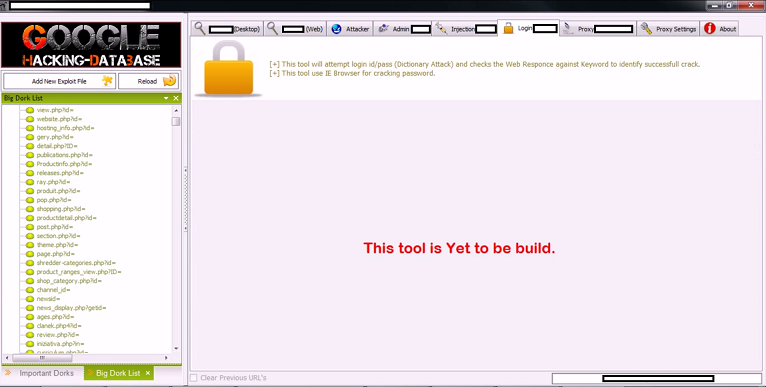
DIY Google Dorks based hacking tool 1
  The price for the DIY Google Dorks based hacking tool is very cheap compared to the advantage deriving from its use, one license costs $10 to pay using the Liberty Reserve currency, or $11 to pay using Western Union transfer. The license are linked to specific host due a hardware-based ID restriction, but the authors also offers an unlimited license for $20 in Liberty Reserve, or $20 in Western Union transfer.
DIY Google Dorks based hacking tool 2
 DIY Google Dorks based hacking tool 3
Cyber criminals can exploit hundreds of thousands of legitimate Web sites is various ways and tools such as the DIY Google Dorks based hacking tool facilitate attacks. Dancho Danchev in his interesting post described the principal techniques used to compromise website:
  • Use of search engine reconnaissance through DIY SQL/RFI (Remote File Inclusion) tools or botnets, the category includes a wide range of application that automatically exploit improper configured websites such as  blogging platforms or well known CMS.
  • Use of data mined or purchased stolen accounting data, cyber criminals could gather information on malware infected machine, looking for login credentials to be automatically abused with malicious scripts and actual executables getting hosted on legitimate websites in an attempt to trick a security solution’s IP reputation process.
  • Active exploitation of server farms – criminals try to infect the larger number of low profile websites as possible, a common practice observed by security researchers is the exploiting of servers that host large number of domains, for example using commercially available Apache backdoors.
Cybercrime underground is in offering all necessary to organize a fraud without having particular knowledge of various technological platforms (e.g. Mobile) and proposing a new efficient model of sales such as the FaaS… it is crucial to follow the black market evolution to avoid shocking surprises.

Thursday, 15 August 2013

Indian Government buying deep surveillance, monitoring equipment ---> Mobile is spy for Indians

Amid a raging global debate on privacy versus surveillance, monitoring and use of intrusive technologies by governments, the Directorate of Forensic Sciences in the Ministry of Home Affairs (MHA) is set to purchase a range of equipment and software that will allow it to conduct deep search, surveillance and monitoring of voice calls, SMS, email, video, Internet, chat, browsing and Skype sessions on an unprecedented scale.
The shopping list may help the government counter crime and terrorism but civil liberties advocates worry about the misuse of these technologies against ordinary citizens, especially given the absence of strong privacy protection.
The MHA document of July 12, 2013 also lists software-based tool kits for logical level analysis of GSM and CDMA mobile phones — which will comprehensively cover phones and SIMs used by India’s 860 million subscribers across 2G and 3G networks. This will be capable of extracting the phone’s basic information and SIM card data, including in your phonebook and contact list, call logs, caller group information, organizer, notes, live and deleted SMSs, web browser artifacts, multimedia and email messages with attachments, multimedia image audio and video files and details of installed applications, their data, traffic and sessions log. It will allow access to iPhone backup analysis, including those which are password protected. Blackberry, considered safe by unsuspecting users, will also be fair game, since it will support Blackberry IPD backup analysis, even when password protected.

Mobiles and SMS

The specialised hardware on the MHA’s list will be able to extract all data, including call logs, phone books, SMS, email messages along with attachments, MMS, calendars, including passwords and location information. It will be able to read SIM cards and extract SIM-card-related information along with all user information on the SIM card, like phone call register and text messages, even if they have been deleted. The software will be capable of data authentication by hashing algorithms, and will even access deleted phone information by recovering or bypassing passwords. Special forensic kits are being brought in for Chinese mobile phones.

Bypassing passwords

Hardware forensic imaging devices with the capability to acquire data from live systems and content-based images are being procured. The capabilities also include the ability to search for key words in the suspected media and to acquire data over a network. Essentially, this would mean blind, across-the-board search on mass data rather than a targeted search based on an authorised target phone number, email or IP address.
The MHA is also set to acquire software for forensic previewing, for analysis of digital media and smartphones. This can acquire date from various types of storage media including in multi-sessions. It can support Windows, Unix, Linux, Sun, Solaris, Macintosh, Apple’s iOS, Android, Blackberry, HP’s palm OS, Nokia Symbian, Windows Mobile OS, etc. The software will be capable of decrypting volumes, folders and files of suspected media including that which is subject to various types of encryption — including 32 and 64-bit systems.
Software is also being ordered for previewing, image mounting, password cracking and forensic analysis of digital media. This would allow recovering folders, expanding compounded files, saved email data bases, extracting artifacts, time line analysis, and registry log analysis. It will allow the government to auto-detect passwords of protected files and their decryption across a range of encryptions.
The new forensic tool will automatically check for disk encryption, including Truecrypt, PGP, Bitlock and Safeboot. This forensic tool will be capable of collecting and recovering artifacts from live and off-line systems when using cloud artifacts like Dropbox, Carbonite, Skydrive, Googledocs, Google Drive and Flickr. It will link into, and extract data out of, users’ social networking pages like Facebook, Twitter, Bebo Chat, Myspace Chat, Google+ and Linkedin. Similarly, webmail applications like Gmail, Yahoo, Hotmail and instant messenger chat can be targeted through this kit. Instant messenger chat like GoogleTalk chat, Yahoo chat, MSN/Windows Live Messenger, AOL, Skype, ICQ, World of War Craft, Second Life and Trillian, will all be open to collection of artifacts, whether live or offline. The system will also accurately target web browser activity on Internet Explorer, Firefox, Google Chrome, Apple Safari, Opera, Google Maps, etc.
The MHA is one of the nine authorised departments, along with IB and RAW, which is allowed to order surveillance and monitoring of citizens under the Indian law. It has been in the news for being closely involved in the implementation of a nationwide Central Monitoring System covering mobile and Internet users.

Wednesday, 14 August 2013

DDoS: Before, during and after. What should you do?

Back when I first began experimenting with technology the only term in my vocabulary was denial of service attack (DoS). I was a script kiddy using a small program called FateX on my parents AOL dial up. Using this program one could send an “IM Bomb” to other users of the service that were logged into IM. This would force a log out of the service and leads into the definition of this type of attack. “In computing, a denial-of-service attack (DoS attack) or distributed denial-of-service attack (DDoS attack) is an attempt to make a machine or network resource unavailable to its intended users” (“Denial-of-service attack,”).
Today we have what is known as a distributed denial of service attack – an attack that comes from multiple locations, not just a teenagers PC.
There are many ways of performing DoS and DDoS attacks against targets, Wikipedia has a great page on the various methods.
It is safe to assume that at some point your network will come under a DDoS attack, having a plan and incident response is highly recommended and almost a necessity today.

Before a DDoS

Every organization should have at least one individual that understands a DDoS attack. Whether it is the onsite tech guru of a small organization, the external tech service supplier for a small to medium company, or the IT security individual / group at larger organizations, they need to have an intermediate knowledge of how these attacks are performed and a plan of what to do when it happens.

The Plan

What can one do before a DDoS? Simple: plan. There are a few recommended techniques that will benefit the department overall.
1)      Establish a relationship with your ISPs. This does not mean the sales guy! Call your ISP and setup a meeting to discuss your account, request a technical rep be onsite as well. During this meeting discuss with them how they handle your traffic, what sits between your office, the hub you are connected to and their backbone. What are the numbers for the 24/7 NOC, who are the managers in charge of it? How do they help with DDoS attacks?
The purpose of this meeting is to get as much information from them as possible so during an attack your team has a quick reference sheet to turn to. This sheet should provide NOC numbers, escalation numbers, and how this ISP handles DDoS attacks (as well as other types of attacks). You would be surprised how many organizations know nothing of their ISP.
2)      Plan for as much capacity as possible. Not many organizations have the funds to do this, consider you lucky if yours does. After performing an analysis of the network traffic over a few months one can see how much capacity is needed, take the largest peak traffic and multiply it by 10. This is not a cure-all, but will ensure that the hardware can handle smaller attacks.
3)      Configure remote monitoring and alerting. Let us assume that you have internal monitoring that can detect DDoS or other anomalies, great! Unfortunately now that your links are saturated or your systems are offline, how will you get alerted? Your internal systems are either offline or too saturated to send that text message or email. Solution: remote monitoring. A client I have worked with in the past needed to ensure the highest uptime for their internal email system as well as receive alerts during outages. They configured remote monitoring of their service that alerted yahoo and gmail accounts of the department. Senior members of the team had their phones configured with the IT department accounts.
4)      Be active in the local IT Security community. Join the local chapter of the FBI InfraGuard, the HTCIA, etc… Contact the local police department, the state police department and the FBI. Meet with the cyber security people from each organization and ask what you should do during a cybercrime. Ensure that you have all of the appropriate contact information after these meetings.

During a DDoS

We have a plan in place and our worst fears our realized: an unknown organization has decided to begin a DDoS attack. The senior members of the IT team just received an email to the group yahoo and gmail accounts that all services are down. An onsite tech has been dispatched and has informed the team that we are receiving 30Gbps aggregated across all links which is bringing down certain network devices as well as systems.

The Plan

1)      Gather as much information about the attack as possible:
  1. What type of attack
  2. Can the source(s) of the traffic be identified
  3. Is a particular system being targeted
2)      Block the source IPs – be sure to keep a log of all of these as they may be legitimate IPs that are either spoofed, or the machine is a zombie.
3)      Immediately contact the ISPs. Pull out the ISP sheet let them know what is going on, provide as much info as possible and see if they can help identify and drop the traffic from their systems. If you are not getting the response you require, escalate to the senior members of their team.
4)      Continually check all systems to ensure that the DDoS is not a distraction for another attack or causing other issues with the affected systems.

After a DDoS

The attack has either subsided or been successfully repelled. Now the tedious work begins.
Start by collecting all of the logs over the course of the attack. Review them to determine where the traffic was coming from and what type of traffic was being sent. Work with your ISPs to identify as much information about the attack as possible. Pull out the list of IPs and determine their location, let the abuse contact of each ISP know (through WHOIS).
Once all the information has been collected call your contact at the local police department. Let them know what happened, what information you have, if they can assist or if you should escalate to the State or FBI. Once it has been determined who you need to speak with pass all of the information you have to them and hope they can identify the source and cause.
Go through every system to ensure they are operating optimally. Check for any anomalous issues and verify that no system has been compromised. Change passwords.
Finally evaluate your response to the incident as there are always areas to improve. Fine tune the plan and bring all of your staff out for a few beers, you just survived your first DDoS.

OWSAP WebGoat - vulnerable web application Attack

WebGoat Week 9

Exploit Unchecked Email
This lesson has two steps: first you are to send a malicious script to the website admin and second you are to send a malicious script to a ‘friend’ from OWASP.
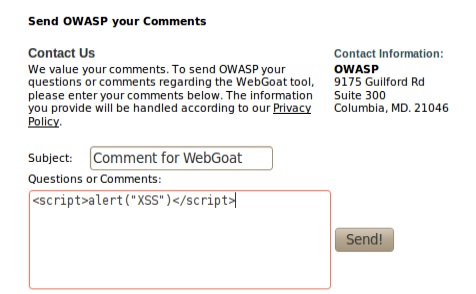
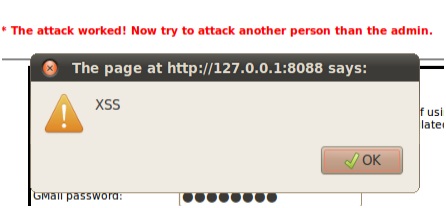
So the first thing you are going to do is put the input shown below into the Questions or Comments textbox and click send:
<script>alert(“XSS”)</script>


Next we need to send it to a ‘friend’ from OWASP.
Again put the script into the same textbox as before but before you click Send open up Tamer Data and start the tamper service. Intercept the request and change the to field to another email address.

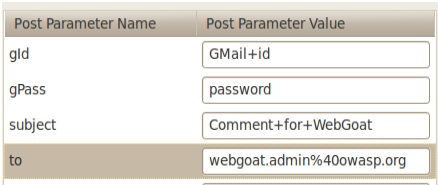
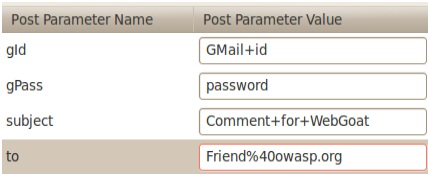
You can see here that the email was going to webgoat.admin@owasp.org (40 is the ASCII for @, you need to put the % for URL encoding). So let’s send this to friend@owasp.org. You will need to enter this:
Friend%40owasp.org

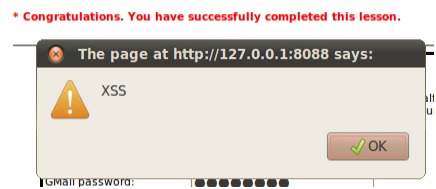
Click the OK button and you should see this:

Bypass Client Side JavaScript Validation
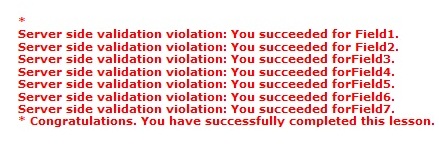
For this lesson you are given seven JavaScript validation mechanisms, all of which must have valid values in to submit successfully. You are told that both client-side and server side validation occur on these mechanisms; break the client-side validation.

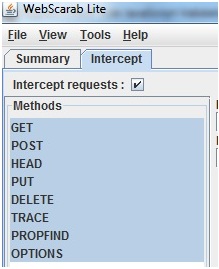
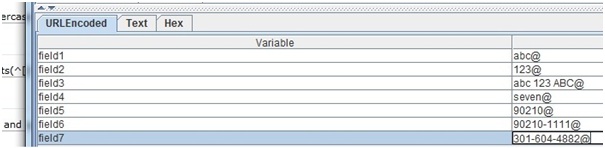
Open WebScarab and check off request intercepts make sure to have everything highlighted.  Now go the page and hit submit. Go to the WebScarab window and check the encoded url tabbed, and you will see the values. Simply modify them, in the screenshot below I simply added the @ to each field and then press accept.


Session Management Flaws
Hijack a Session
For this lesson you are attempting to gain access to a user’s session.
You will need the jhijack tool available at http://sourceforge.net/projects/jhijack/.  Go head and startup WebScarab and set your proxies. Turn on request intercepts, view hidden fields and finally launch the Jhijack.  Now reload the page and we will look at webscarab.

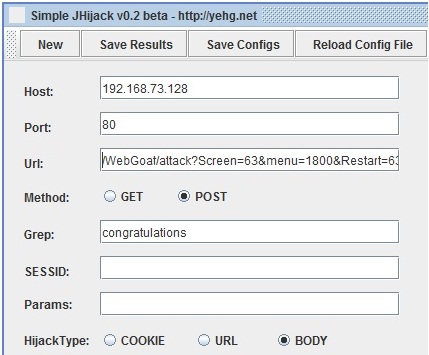
Let’s take a moment and configure out jHijack. We need put our Host, and port into it first.  In the example below we see the IP address of this particular VM and port number, yours maybe different. Now we need to find a success message of some kind. So far we have noticed in Webgoat, that every time we complete a mission we get a “Congratulations” so let’s use that in our Grep (it’s case sensitive).  The last part we need to fill in is the URL.  See below.

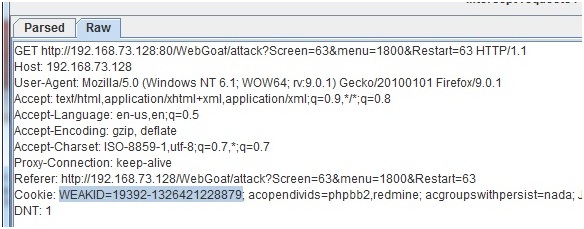
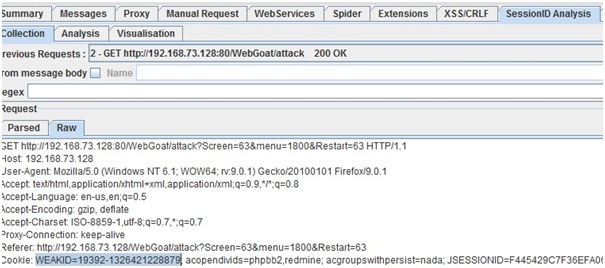
Now we need to go back to WebScarab and select the Session ID tab (if you don’t see it make sure you are using WebScarab in it’s full version. Select previous requests and choose the appropriate url (picture below).  Now select the cookie weakid and remove it.

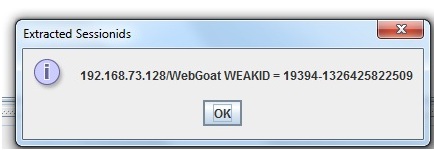
Go to the bottom of the screen and hit test. You should receive this success message.

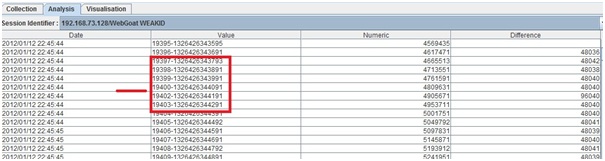
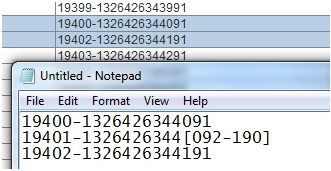
Now we need to collect some data. Set the fetch number to 50 and hit fetch. Go up to the Analysis tab and set the session ID and you should receive the list of cookies out there.  We want to look specifically at the Session ID numerical value. Not that it is incrementing by 1.  Now, there is a gap there, between 19400 and 19402. That’s an open session so let’s focus on that.

The second part of the values has a large gap between them so we need to “guess” at what that value is, but we have JjHijack to make this really simple. Copy out the one above and below the target and  paste them into a notepad. Doing this makes it easier to see and copy.  See the example below. Notice the [] is a range.

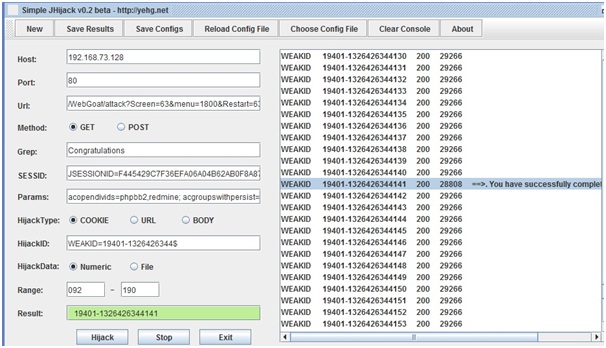
Now it’s simply filling in the missing information in jHijack. Go back to WebScarab and gather the JsessionID, parameters and  enter them in. Note we want to place a $ at the end of our WEAKID value. Finally, take the range and enter that in.  Then hit hijack. See below.

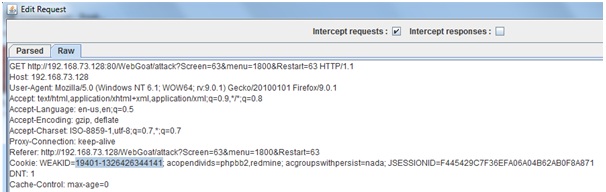
We refresh the page one last time and go back to the WebScarab intercept and swap out the weakid.

And hit accept and we have our congratulations message.

Spoof an Authentication Cookie
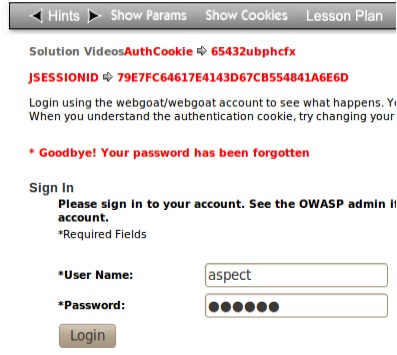
For this lesson you are told to login using either webgoat/webgoat or aspect/aspect as the username/password combination. Next you are told to edit the cookie to change your identity to alice.
So first off log in as webgoat and click the Login button.

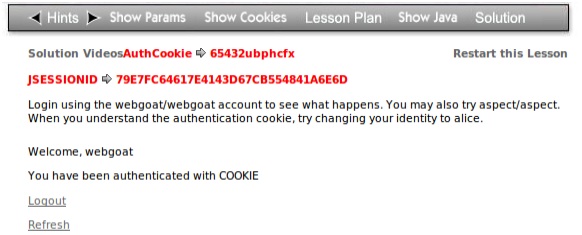
On the top of the webgoat page you should see a link that says Show Cookies. Click on the Show Cookies option and you will see the cookie that was created when you logged in as webgoat.

The authorization cookie or the user webgoat is 65432ubphcfx as shown above.
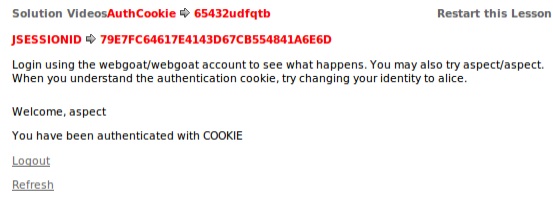
Go ahead and click the Logout button and then login with aspec/aspect next:

Click on the Show Cookies link again (might have to click twice) and you should get your authorization cookie:

For this authorization cookie we see that aspect has a value of 65432udfqtb.
So the different between the two logins is the letters after 65432.
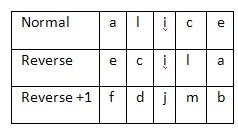
The key to this attack is that the username is a really basic cipher. Let’s take a look at these authorization cookies versus their usernames:

The first thing that I noticed was that both the aspect and webgoat ciphers both start with u as the first character. The second thing that I noticed is that both webgoat and aspect both end in t. Next you can see that the last character of the webgoat cipher is x and x is one letter ahead of w. Also u is one character ahead of t which explains why both ciphers tart with u. The cipher pattern is a reverse of the login name and all letters are shifted up one. Now that we know this we can begin editing the cookie to change our login name to alice.
To do this lets first do the cipher by hand:

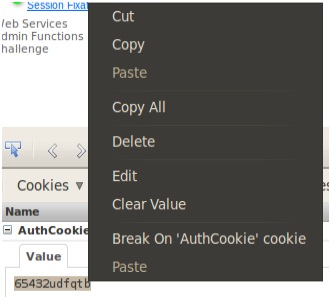
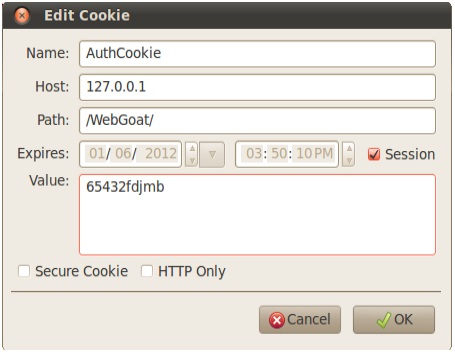
Ok now open up Firebug and edit the cookie value so that it is 65432fdjmb
To do this right click on the AuthCookie value when the menu for it is expanded and click Edit:

You will see a popup window called Edit Cookie. Change the value to the one we determined for user alice:

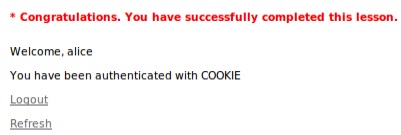
Click the OK button and refresh the page.