Tuesday, 29 March 2016

Security Checklist


Is the website only served over https?  


Test : 

$ curl -s -I http://example.org | grep '^HTTP'
                HTTP/1.1 301 Moved Permanently
                $ curl -s -I https://example.org | grep '^HTTP'
                HTTP/1.1 200 OK 


Is the HSTS http-header set?  


Test : 

$ curl -s -I https://example.org | grep '^Strict'
                Strict-Transport-Security: max-age=63072000; includeSubdomains;
              

Is the server certificate at least 4096 bits?  


Test : 

$ openssl s_client -showcerts -connect example.org:443 |& grep '^Server public key'
                Server public key is 4096 bit


Is TLS1.2 the only supported protocol?  


Test : 

$ curl --sslv3 https://example.org
curl: (35) Server aborted the SSL handshake
$ curl --tlsv1.0 -I https://example.org
curl: (35) Server aborted the SSL handshake
$ curl --tlsv1.1 -I https://example.org
curl: (35) Server aborted the SSL handshake
$ curl --tlsv1.2 -s -I https://example.org | grep 'HTTP'
HTTP/1.1 200 OK 

Do all supported symmetric ciphers use at least 256 bit keys? 

Test : 

$ nmap --script ssl-enum-ciphers -p 443 example.org
              PORT    STATE SERVICE
              443/tcp open  https
              | ssl-enum-ciphers:
              |   TLSv1.2:
              |     ciphers:
              |       TLS_DHE_RSA_WITH_AES_256_CBC_SHA - strong
              |       TLS_DHE_RSA_WITH_AES_256_CBC_SHA256 - strong
              |       TLS_DHE_RSA_WITH_AES_256_GCM_SHA384 - strong
              |       TLS_ECDHE_RSA_WITH_AES_256_CBC_SHA - strong
              |       TLS_ECDHE_RSA_WITH_AES_256_CBC_SHA384 - strong
              |       TLS_ECDHE_RSA_WITH_AES_256_GCM_SHA384 - strong
              |     compressors:
              |       NULL
              |_  least strength: strong    


Is the Diffie-Hellman prime at least 4096 bits?  

Test : 

$ openssl s_client -connect example.com:443 -cipher "EDH" |& grep "^Server Temp Key"
                Server Temp Key: DH, 4096 bits 

Have you ensured that your content cannot be embedded in a frame on another website?  

Test : 

$ curl -s -I https://example.org | grep '^X-Frame-Options'
                X-Frame-Options: SAMEORIGIN
                $ curl -s -I https://example_2.org | grep '^X-Frame-Options' 
                X-Frame-Options: DENY # Also acceptable 

Have you ensured that the Internet Explorer content sniffer is disabled? 

Test :  

 $ curl -s -I https://example.org | grep '^X-Content'
                X-Content-Type-Options: nosniff
              

Have you disabled password-based login over ssh, and only allowed key-based login?  

Test : 

 $ cat /etc/ssh/sshd_config  | grep '^Password'
                PasswordAuthentication no
              

Do session cookies have the 'Secure' and 'HttpOnly' flag set?  

Test : 

  • $ curl -s -I example.com/url_that_sets_cookie | grep '^Set-Cookie' 

  • Set-Cookie: ****;Path=/;Expires=Fri, 16-Mar-2018 19:18:51 GMT;Secure;HttpOnly;Priority=HIGH


Wednesday, 23 March 2016

A Tool to Find And Exploit Servers Vulnerable to Shellshock

Shocker

A tool to find and exploit servers vulnerable to Shellshock
Released as open source by NCC Group Plc - https://www.nccgroup.trust/

How to use  


Help Text
usage: shocker.py
-h, --help show this help message and exit
--Host HOST, -H HOST A target hostname or IP address
--file FILE, -f FILE File containing a list of targets
--port PORT, -p PORT The target port number (default=80)
--exploit EXPLOIT, -e EXPLOIT Command to execute (default=/bin/uname -a)
--cgi CGI, -c CGI Single CGI to check (e.g. /cgi-bin/test.cgi)
--proxy PROXY A BIT BROKEN RIGHT NOW Proxy to be used in the form 'ip:port'
--ssl, -s Use SSL (default=False)
--threads THREADS, -t THREADS Maximum number of threads (default=10, max=100)
--verbose, -v Be verbose in output  

TODO

  • Identify and respond correctly to HTTP/200 response - false positives - Low priority/hassle
  • Implement curses for *nix systems - For the whole application or only psuedo terminal? - Low priority/prettiness
  • Thread the initial host check now that multiple targets are supported (and could be make this bit time consuming)
  • Change verbose to integer value - quiet, normal, verbose, debug?
  • Add option to skip initial host checks for the sake of speed?
  • Add a summary of results before exiting
  • Save results to a file? Format?
  • Eventually the idea is to include multiple possible vectors but currently only one is checked.
  • Add Windows and *nix colour support - Low priority/prettiness
  • Add a timeout in interactive mode for commands which don't return, e.g. /bin/cat /dev/zero
  • Prettify - Low priority/pretinness (obviously)
  • Add support for scanning and explointing SSH and SMTP? https://isc.sans.edu/diary/Shellshock+via+SMTP/18879
  • Add SOCKS proxy support, potentially using https://github.com/rpicard/socksonsocks/ from Rober Picard
  • Other stuff. Probably. 

Tuesday, 22 March 2016

IIS Short Name Scanner v2.3.8

The latest version of scanner for IIS short file name (8.3) disclosure vulnerability by using the tilde (~) character.

Description

Microsoft IIS contains a flaw that may lead to an unauthorized information disclosure. The issue is triggered during the parsing of a request that contains a tilde character (~). This may allow a remote attacker to gain access to file and folder name information. 
It is possible to detect short names of files and directories which have an 8.3 equivalent in Windows by using some vectors in several versions of Microsoft IIS. For instance, it is possible to detect all short-names of ".aspx" files as they have 4 letters in their extensions.
Note: new techniques have been introduced to the latest versions of this scanner and it can now scan IIS8.5 when it is vulnerable.
It is not easy to find the original file or folder names based on the short names. However, the following methods are recommended as examples:
  • If you can guess the full extension (for instance .ASPX when the 8.3 extension is .ASP), always try the short name with the full extension.
  • Sometimes short names are listed in Google which can be used to find the actual names
  • Using text dictionary files is also recommended. If a name starts with another word, the second part should be guessed based on a dictionary file separately. For instance, ADDACC~1.ASP can be AddAccount.aspx, AddAccounts.aspx, AddAccurateMargine.aspx, etc
  • Searching in the website contents and resources can also be useful to find the full name. This can be achieved for example by searching Site Map in the Burp Suite tool.

How to Installation

It has been compiled by using JDK 7. You only need to download the following files if you do not want to build this yourself:
  • iis_shortname_scanner.jar
  • config.xml
  • run.bat
  • multi_targets.sh
Remember to use Java v7.
You can also compile this application yourself. Please submit any issues in GitHub for further investigation. It should be straight forward to open this project in Eclipse as well. 

How to use 

Command line options

USAGE 1 (To verify if the target is vulnerable with the default config file): java -jar iis_shortname_scanner.jar [URL]
USAGE 2 (To find 8.3 file names with the default config file): java -jar iis_shortname_scanner.jar [ShowProgress] [ThreadNumbers] [URL]
USAGE 3 (To verify if the target is vulnerable with a new config file): java -jar iis_shortname_scanner.jar [URL] [configFile]
USAGE 4 (To find 8.3 file names with a new config file): java -jar iis_shortname_scanner.jar [ShowProgress] [ThreadNumbers] [URL] [configFile]
USAGE 5 (To scan multiple targets using a linux box): ./multi_targets.sh
DETAILS: [ShowProgress]: 0= Show final results only - 1= Show final results step by step - 2= Show Progress [ThreadNumbers]: 0= No thread - Integer Number = Number of concurrent threads [be careful about IIS Denial of Service] [URL]: A complete URL - starts with http/https protocol [configFile]: path to a new config file which is based on config.xml
Examples:
- Example 0 (to see if the target is vulnerable):
 java -jar iis_shortname_scanner.jar http://example.com/folder/

- Example 1 (uses no thread - very slow):
 java -jar iis_shortname_scanner.jar 2 0 http://example.com/folder/new%20folder/

- Example 2 (uses 20 threads - recommended):
 java -jar iis_shortname_scanner.jar 2 20 http://example.com/folder/new%20folder/

- Example 3 (saves output in a text file):
 java -jar iis_shortname_scanner.jar 0 20 http://example.com/folder/new%20folder/ > c:\results.txt

- Example 4 (bypasses IIS basic authentication):
 java -jar iis_shortname_scanner.jar 2 20 http://example.com/folder/AuthNeeded:$I30:$Index_Allocation/

- Example 5 (using a new config file):
 java -jar iis_shortname_scanner.jar 2 20 http://example.com/folder/ newconfig.xml 

- Example 6 (scanning multiple targets using a linux box):
 ./multi_targets.sh scope.txt 1
Note 1: Edit config.xml file to change the scanner settings and add additional headers. Note 2: Sometimes it does not work for the first time and you need to try again. 
Download tool : https://goo.gl/XcXD7K

Monday, 21 March 2016

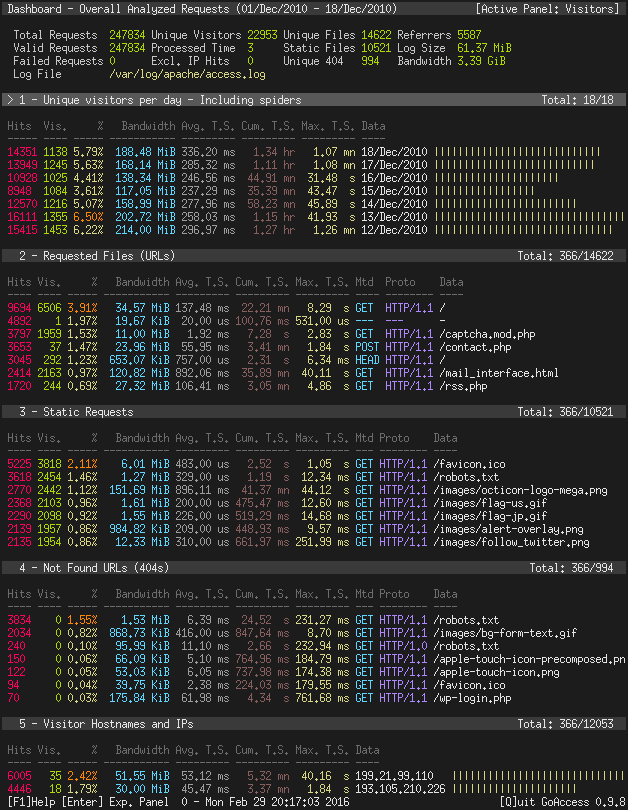
Real-Time Web Log Analyzer

GoAccess is an open source real-time web log analyzer and interactive viewer that runs in a terminal in *nix systems. It provides fast and valuable HTTP statistics for system administrators that require a visual server report on the fly.  


GoAccess Main Dashboard

Features

GoAccess parses the specified web log file and outputs the data to the X terminal. Features include:
  • General statistics, bandwidth, etc.
  • Time taken to serve the request (useful to track pages that are slowing down your site)
  • Metrics for cumulative, average and slowest running requests
  • Top visitors
  • Requested files & static files
  • 404 or Not Found
  • Hosts, Reverse DNS, IP Location
  • Operating Systems
  • Browsers and Spiders
  • Referring Sites & URLs
  • Keyphrases
  • Geo Location - Continent/Country/City
  • Visitors Time Distribution
  • HTTP Status Codes
  • Metrics per Virtual Host
  • Ability to output HTMLJSON and CSV
  • Tailor GoAccess to suit your own color taste/schemes
  • Incremental log processing
  • Support for large datasets and data persistence
  • Support for HTTP/2 & IPv6
  • Output statistics to HTML. See .

Nearly all web log formats...

GoAccess allows any custom log format string. Predefined options include, but not limited to:
  • Amazon CloudFront (Download Distribution).
  • AWS Elastic Load Balancing
  • Combined Log Format (XLF/ELF) Apache | Nginx
  • Common Log Format (CLF) Apache
  • Google Cloud Storage.
  • Apache virtual hosts
  • Squid Native Format.
  • W3C format (IIS). 
Download tool : https://goo.gl/kmE8R9

What, When, Where, How Ethical Hacking?

What is Ethical Hacking?
             It is a way to hack computer and network with organization permission .By the help of Ethical Hacking you can find the point which has to give permission to enter unauthorized person (intruder). Ethical hacking is a proactive form of information security and is also known as penetration testing, intrusion testing and red teaming. Those who doing Ethical hacking is known as Ethical Hacker.  An Ethical Hacker is a computer and networking expert who systematically attempts to penetrate a computer system or network on behalf of its owners for the purpose of finding security vulnerabilities that a malicious hacker could potentially exploit.
                An ethical hacker is the complete opposite of a malicious hacker. An ethical hacker is an information security professional. This is a good guy. They use the same methods and techniques to test and bypass a system's defenses as their less-principled counterparts, but rather than taking advantage of any vulnerabilities found, they document them and provide actionable advice on how to fix them so the organization can improve its overall security.
 For hacking to be deemed ethical, the hacker must obey the following rules:
  •    Expressed permission to probe the network and attempt to identify potential security risks.
  •    Ethical Hacker should respect the individual's or company's privacy.
  •    Ethical Hacker should close out your work, not leaving anything open for you or someone     else to exploit at a later time.
  •   Ethical Hacker should let the software developer or hardware manufacturer know of any security vulnerabilities you locate in their software or hardware, if not already known by the company.
Purpose of Ethical Hacking: -
  • Evaluate the security of a network or system's infrastructure
  • Finding and attempting to exploit any vulnerabilities to determine whether unauthorized access or other malicious activities are possible
Whom they need Ethical Hacking: -
  •  Any organization that has a network connected to the Internet or provides an online service should consider subjecting it to a penetration test.
  • Banker 
  •  Government agencies
  •   Business Organization
Goal of the Ethical Hacking: -
  •   Fighting against terrorism and national security breaches?
  • How much effort, time and money are an organization is willing to expend to obtain adequate protections?
  • Having adequate preventative measures in place to prevent security breaches?
  • What can intruder do with the information capture?
  • Having a computer system that prevents malicious hackers from gaining access
  • What is organization to protect?
  • Are your developers are concerned about security?
  • Is your customer and clients data's are exposed to public or not?
  • Do you have better brand reputation?
What are the benefits to organization if they have Ethical Hacker: -
  •  Organizations under constant Cyber-Attack
  •  To build a computer system that prevents hackers’ access and safeguard system and information from malicious attack
  •  To manage adequate preventive measures in order to avoid security breaches
  •   To safeguard user or customer information available in business transactions and visits
  •   To test networks at regular intervals
  •   To create security awareness at all levels in a business
How to become a professional and Qualified Ethical Hacker?
  •  Know about the different types of hackers, such as White Hat, Grey Hat and Black Hat hackers.
  • Seek out job opportunities for ethical hackers.
  • Analyse the basic requirements to become an ethical hacker.
  •  Decide the area where you would prefer to work primarily with hardware or software.
  • Evaluate your strengths and interests and gain some programming knowledge such as C, Python or Java.
  • Learn the UNIX operating system as it is regarded as the original operating system built by hackers.
  • Take a professional course.
  • Do the experiments on your own to know the actual happening of a situation.
  •  Start experimenting with hardware and software to learn how to take control of the situations and how to prevent a computer from getting hacked.
  • Read on your own to know what are the areas where you need to improve and what need to be learned to refine your focus. 
  • Stay connected to the hacker community by sharing technical information and ideas.
 Disadvantages of Ethical Hacking: -
  • The ethical hacker using the knowledge they gain to do malicious hacking activities
  • Allowing the company’s financial and banking details to be seen
  • The possibility that the ethical hacker will send and/or place malicious code, viruses, malware and other destructive and harmful things on a computer system
  • Massive security breach
Should we trust Ethical Hacking Certificate courses?
  • Hacking is the skill which cannot learnt with in a certification. But can understand what is hacking.
  •  Self learning is a right option to become good ethical hacker
  •  International certifications are concerned to create brand instead of certification
  •  Learn hacking via Open source tool is advisable
  • Ethical hacking boundary should depends on your cyber countries security law.
Conclusions: -
                Hacking may be defined as legal or illegal, ethical or unethical. The media’s portrayal of hacking has boosted one version of discourse. Ethical Hacking offer unparalleled insight into an organization’s security effectiveness as well as a road map for enhancing security.  By hiring Ethical Hacker to simulate a cyber-attack, vulnerabilities can be identified and corrected before they are exploited by a hacker or malicious insider.  It is suggested that this section echo portions of the overall test as well as support the growth of the client security posture.